Why Is My USB Charging Cable Not Working?
FLUID HANDLING EXPERTS

Blog, all our news

Why Is My USB Charging Cable Not Working?

A phone that stops charging can make a good cable look broken. The screen stays dark, the battery icon flickers, or charging works only when the plug is held at an angle. Before replacing your Usb Charging Cable, check the full charging path: cable, adapter, outlet, and device port. A fault in any one of them can produce the same frustrating symptom.

USB-IF President and COO Jeff Ravencraft is a recognized authority on USB standards. Without a verified verbatim quote on this specific issue, it would be misleading to put invented words in his mouth. A practical paraphrase of standards-focused troubleshooting is: “Check the whole charging path, not just the cable.” That means trying a known-working adapter and outlet, inspecting the cable ends for bent or loose connectors, and looking for lint inside the phone’s port. Don’t force the plug. Small details matter.

Wear is not always obvious. A cable may charge slowly, disconnect when moved, or work with one device but not another. Those clues help narrow the cause, but they do not prove it. I have seen simple checks save an unnecessary purchase; I have also seen a cable appear fine and fail under normal use. That uncertainty is worth admitting. This guide explains common causes, safe tests, and when replacing the cable—or asking a technician to inspect the device—is the sensible next step.
Why Is My USB Charging Cable Not Working?

How a USB Charging Cable Delivers Power

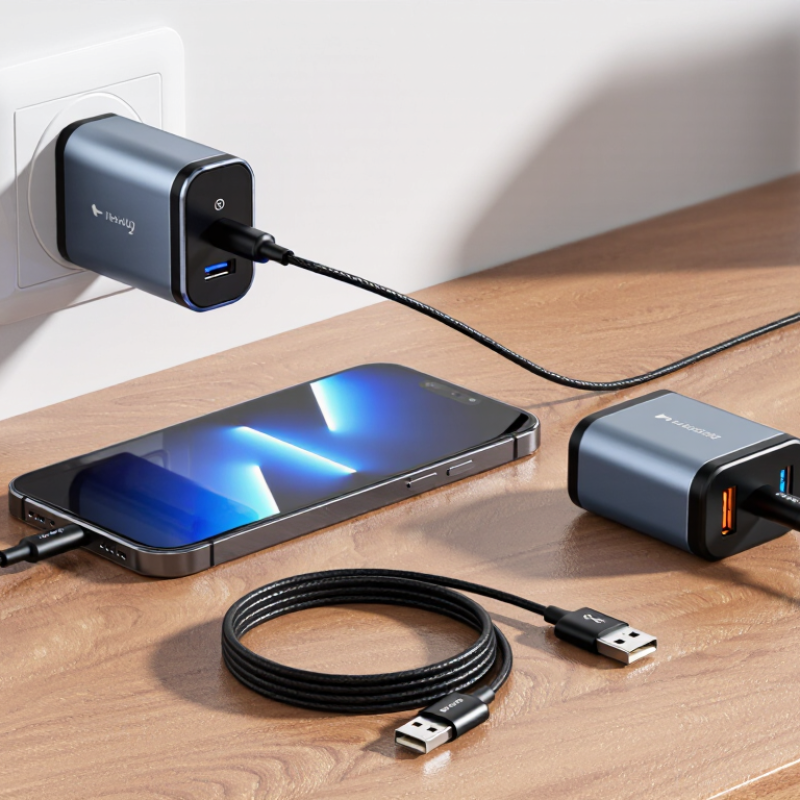
A USB charging cable carries power from a USB port or adapter to a device. Inside, metal conductors connect the power line and ground. The adapter supplies voltage, while the cable completes the path. Simple, but not magic. Some cables also carry data or signal information used to agree on a faster charging rate. With USB-C, small contacts help devices identify the connection and supported power levels. If those contacts are dirty, bent, or poorly connected, charging may slow or stop.

A cable can look fine and still have damage near either plug. Repeated bending may break a conductor inside its insulation. Thin or long cables can also create more electrical resistance, reducing the power that reaches a device. It is easy to blame the adapter first; I sometimes do. Yet a loose port or worn cable may be the real problem.

Tips: Try a different cable and power source, one at a time. Check the plugs for lint or visible damage, and keep liquid away. Don’t force a connector into the port. If charging works only when the cable is held at an angle, stop using it and inspect the device port. Small details count.

Common Reasons a USB Charging Cable Stops Working

A USB charging cable can stop working because its wires have worn down inside the outer sheath. Repeatedly bending the cable near the plug puts stress on a small area. The outside may look fine while charging cuts in and out when the cable moves. That’s easy to miss.

Dirt or lint around the connector can also prevent a firm connection. Check the plug and device port under good light, and disconnect power before inspecting them. Avoid forcing anything into the port; a soft, dry brush may help remove loose debris. Not every charging problem is the cable, though. A faulty power adapter, outlet, or device port can create the same symptoms.

Look for split insulation, bent connector edges, discoloration, or unusual heat. Stop using a cable that is frayed or gets hot. Try a known-working cable with the same adapter, then test your cable with another suitable power source. Change one item at a time. It can feel obvious, but swapping everything at once makes the cause harder to identify. Intermittent faults are especially frustrating; a cable might charge steadily on a desk and fail when moved.

How to Inspect a Cable for Damage or Contamination

Why Is My USB Charging Cable Not Working?

How to Inspect a Cable for Damage or Contamination

Unplug the cable before inspecting it. Check the full length under bright light, especially near both connectors, where repeated bending often causes damage. Look for split insulation, flattened sections, exposed wires, or a connector that feels loose. Run your fingers gently along the cable. Stop if you notice fraying or warmth.

Small debris can also interrupt charging. Examine the connector opening for lint, dust, or residue. Don’t poke it with a pin or pour cleaner into it. Use a dry, soft brush to loosen visible debris, then let the connector remain dry. It’s easy to blame the cable, though the charging port may be dirty too.

How to Test the Cable with Another Device and Charger

When a USB charging cable stops working, test the cable separately from the charger and device. Look for a bent plug, frayed jacket, or looseness where the cable meets its connector. Use a known-working charger and wall outlet, then connect the suspect cable to a second compatible device. Keep the devices still. Watch for a charging symbol, and gently reposition the plug once; charging that cuts in and out can point to a damaged cable or connector.

Now keep the charger and device unchanged, but swap in a cable that you know works. If the replacement charges normally, the original cable is the likely problem. If neither cable works, test the original cable with another charger too. This helps separate cable trouble from a weak power adapter or a dirty, damaged device port. Avoid forcing the plug; inspect the port with a light instead. Small debris can make contact unreliable.

The USB-IF USB Type-C Cable and Connector Specification includes a 10,000-cycle connector durability test. That is a lab requirement, not a guarantee that every cable will last that long in daily use. A cable repeatedly bent near a plug may fail earlier. A single successful test can still be inconclusive, especially if charging is intermittent. Try the same combinations again, noting which device, charger, and cable were used. Keep it simple.

When to Repair or Replace a USB Charging Cable

A cable that charges only when bent, slips out of the port, or feels unusually warm may be damaged. Check it in good light. Look for split insulation, exposed wire, crushed sections, or a connector that wiggles. Stop using it if you see bare wires or notice a burning smell. That is not a good repair project.

Before replacing it, test the cable with another compatible charging adapter and device. Try a known-working cable with your original setup, too. This helps separate a cable fault from a dirty port or failing adapter. A little lint can block the connection; remove it gently with a dry, soft brush, never a metal object. It is easy to blame the cable too quickly. I would check the other parts first.

Repair is reasonable only for a loose plug or debris that can be safely cleared. Internal cable breaks are harder to fix than they look: thin wires and insulation must be joined securely, and a poor splice can overheat or fail again. For most people, replacement is safer and more reliable than cutting and reconnecting the cable. Replace it if the damage is near either connector, charging cuts in and out, or the cable becomes hot during normal use. A small crack may seem harmless. It can spread with daily bending.

Why Is My USB Charging Cable Not Working? When to Repair or Replace

Voltage drop is calculated from nominal copper resistance for 24 AWG and 28 AWG conductors at 20°C, assuming a 1 m cable with two power conductors. Actual results vary with cable construction, length, temperature, and connector condition. A damaged or unreliable cable should be replaced rather than repaired.

Copyright 2025 Fluidra S.A. | Created by BCM Marketing Agencia Privacy Policy Legal note | Cookie policy |

Technical cookies are strictly necessary for our website to work and you can navigate through it. These types of cookies are those that, for example, allow us to identify you, give you access to certain restricted parts of the page if necessary, or remember different options or services already selected by you, such as your privacy preferences. Therefore, they are activated by default, your authorization not being necessary in this regard. Through the configuration of your browser, you can block or alert the presence of this type of cookies, although such blocking will affect the proper functioning of the different functionalities of our website.


The analysis cookies allow us to study the navigation of the users of our website in general (for example, which sections of the page are the most visited, which services are used most and if they work correctly, etc.). From the statistical information on navigation on our website, we can improve both the operation of the page itself and the different services it offers. Therefore, these cookies do not have an advertising purpose, but only serve to make our website work better, adapting to our users in general. By activating them you will contribute to this continuous improvement. You can enable or disable these cookies by checking the corresponding box, being disabled by default.


Functionality cookies allow us to remember your preferences, to personalize certain characteristics and general options of our website, every time you access it (for example, the language in which the information is presented to you, the sections marked as favorites, your browser type, etc.) Therefore, this type of cookies does not have an advertising purpose, but by activating them you will improve the functionality of the website (for example, adapting to your type of browser) and the customization of it based on your preferences (for example, by presenting the information in the language that you have chosen in previous occasions), which will contribute to the ease, usability and comfort of our page during your navigation. You can enable or disable these cookies by checking the corresponding box, being disabled by default.


Advertising cookies allow us to manage the advertising spaces included in our website based on criteria such as the content shown or the frequency in which the ads are displayed. For example, if you have been shown the same ad several times on our website, and you have not shown a personal interest by clicking on it, it will not appear again. In summary, by activating this type of cookies, the advertising shown on our website will be more useful and diverse, and less repetitive. You can enable or disable these cookies by checking the corresponding box, being disabled by default.


Behavioral advertising cookies allow us to obtain information based on the observation of your browsing habits and behaviors on the web, in order to show you advertising content that best suits your personal tastes and interests. To understand it in a very simple way, we will give you a fictitious example: if your last searches on the web were related to suspense literature, we would show you advertising about suspense books. Therefore, activating this type of cookies, the advertising that we show you on our website will not be generic, but will be oriented to your searches, tastes and interests, therefore adjusting exclusively to you. You can enable or disable these cookies by checking the corresponding box, being disabled by default.
To understand it in a very simple way, we will give you a fictitious example: if your last searches on the web were related to suspense literature, we would show you advertising about suspense books. Therefore, activating this type of cookies, the advertising that we show you on our website will not be generic, but will be oriented to your searches, tastes and interests, therefore adjusting exclusively to you. You can enable or disable these cookies by checking the corresponding box, being disabled by default.

SAVE

We use our own and third-party cookies to ensure the proper functioning of the website and to analyse our services, improve your experience on our website and show you advertisements related to your interests according to profiling based on your browsing habits (e.g. websites visited). You can accept all cookies by clicking "ACCEPT" or set or reject them by clicking here. If you would like to know more about the use of cookies, please see our COOKIE POLICY.


ACCEPT ALL
Reject no essentials