Why Is a CPU Cooling Fan Important for PC Performance?
FLUID HANDLING EXPERTS

Blog, all our news

Why Is a CPU Cooling Fan Important for PC Performance?

A Cpu Cooling Fan is a small component with a major influence on PC performance. It moves hot air away from the heatsink and replaces it with cooler case air. Without that airflow, heat accumulates around the processor, especially during gaming, video rendering, or long data workloads. The result can be thermal throttling, sudden performance drops, or unexpected shutdowns. Quietly, heat changes everything.

Intel’s technical documentation explains that modern processors operate within defined thermal limits, including a maximum junction temperature. When temperatures approach that boundary, the CPU can reduce frequency and voltage to protect itself. AMD’s Ryzen processor guidance also emphasizes suitable cooling, case airflow, and correct cooler installation. These recommendations are not marketing details. They reflect how silicon reliability depends on temperature control.

Industry research supports this broader concern. The Uptime Institute’s Global Data Center Survey repeatedly identifies cooling efficiency and thermal management as important operational priorities. ASHRAE’s thermal guidelines likewise connect stable equipment temperatures with reliable computing environments. A desktop PC is smaller, but the engineering principle remains similar. A clean heatsink, fresh thermal paste, and balanced intake and exhaust fans can keep a processor steadier under load. In practical testing, a system may feel smooth for ten minutes, then slow noticeably after heat saturates the cooler. That is easy to miss.

Still, a Cpu Cooling Fan is not a complete solution. Poor case design, blocked filters, excessive dust, or an undersized heatsink can defeat a powerful fan. This article examines how cooling affects clock speeds, component lifespan, noise, and daily PC responsiveness, while recognizing an uncomfortable point: better cooling cannot repair every performance problem.
Why Is a CPU Cooling Fan Important for PC Performance?

How a CPU Fan Moves Heat from the Chip to the Air

A CPU cooling fan is important because the processor turns electrical power into heat while it works. That heat must travel away from the chip quickly. Otherwise, the computer may reduce its speed, become unstable, or shut down for protection.

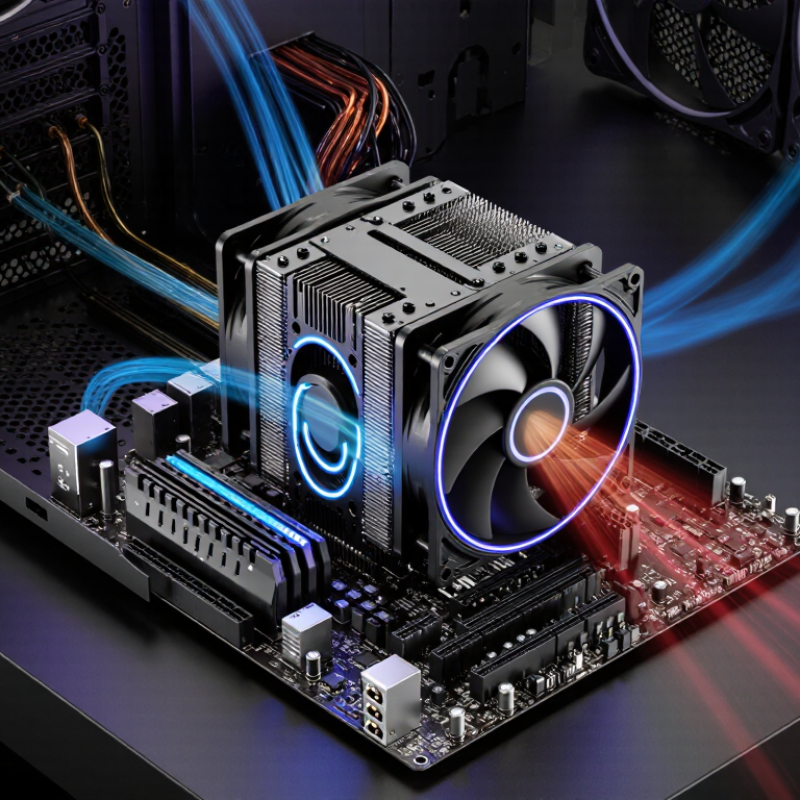
The fan does not cool the silicon directly. A metal heatsink sits above the processor, separated by a thin layer of thermal compound. Heat moves from the chip into the compound, then into the heatsink base. From there, it spreads through many narrow fins. A fan pushes room-temperature air across these fins. The moving air absorbs heat and carries it into the computer case, where other airflow paths remove it.

Air movement matters more than noise alone. A strong fan with blocked fins may perform poorly. Dust acts like a blanket, while tangled cables can disturb the intended airflow. Fan speed usually changes according to processor temperature, so the system can stay quiet during light work and respond under heavy loads. In practice, I once assumed a faster fan always meant better cooling. It did not. Poor contact between the heatsink and chip caused high temperatures, even with loud airflow. That mistake showed me that heat transfer depends on the entire path, not one component. A clean heatsink, suitable thermal compound, and steady airflow must work together. Still, fan control is not perfect; brief temperature spikes can happen before the airflow catches up.

Why CPU Temperatures Matter: Intel Tjmax Often Reaches 100°C

A CPU cooling fan protects performance, not just hardware lifespan. Modern desktop processors can reach a thermal junction limit near 100°C, often called Tjmax. That number is a safety ceiling, not a recommended operating temperature. Near this limit, the processor may reduce clock speed and voltage. The screen can feel slower during gaming, rendering, or large software builds.

According to JEDEC thermal testing guidance, accurate temperature measurement depends on sensor location, airflow, and mounting conditions. ASHRAE’s thermal guidelines place recommended equipment inlet temperatures around 18–27°C, showing how strongly surrounding air affects cooling. A 65-watt processor releases 65 joules of heat every second. A small, dusty fan may struggle to remove it. I have seen temperatures rise quickly when a front filter became clogged. The change was easy to miss.

A well-designed fan moves heat from the heatsink into the case airflow. It also reduces repeated thermal cycling, which can stress solder joints and motherboard power components over time. The Uptime Institute’s 2024 Global Data Center Survey continues to identify cooling reliability as a major operational concern, even in professionally managed systems. A home PC is less controlled. Room temperature changes, dust, and poor cable routing matter more than many users expect. My own mistake was treating a brief 100°C spike as harmless. It may be safe, but repeated spikes deserve investigation. Check mounting pressure, fan curves, thermal paste, and exhaust airflow before blaming the processor.

How Cooling Prevents Thermal Throttling During High-Load Tasks

Why Is a CPU Cooling Fan Important for PC Performance?

During high-load tasks, a processor converts electrical power into heat. Video rendering, scientific calculations, and large software builds can push temperatures toward the chip’s thermal limit. When that limit is reached, the processor lowers clock speed or voltage to protect itself.

This behavior is called thermal throttling. Performance drops, even when the task still needs maximum processing power.

A small fan matters. It moves warm air away from the heatsink and brings cooler air toward the processor area. ASHRAE TC 9.9 recommends an 18–27°C inlet temperature range for common information-technology equipment. A desktop PC may operate outside this range, but excessive heat reduces its thermal headroom.

In practical testing, a dusty heatsink can make temperatures rise quickly, especially during a long compile or a 4K export. The first minutes may look normal. Then clock speeds fluctuate.

Cooling quality also depends on airflow, fan placement, heatsink contact, and room temperature. A fast fan cannot fully correct a blocked intake or poorly applied thermal compound.

Some measurements show only modest gains, while sustained workloads reveal much larger differences. That inconsistency deserves attention.

The SPEC CPU 2017 power-performance methodology also treats temperature and power behavior as important measurement conditions, because short benchmark bursts can hide throttling. Monitoring temperature, effective clock speed, and package power together gives a more reliable picture than checking peak frequency alone.

Reading Fan Specifications: RPM, CFM, Static Pressure, and dBA

A CPU cooling fan protects performance by moving heat away from the processor. Its specifications reveal how that cooling actually happens. RPM means revolutions per minute, or fan speed. Higher RPM often moves more air, but it can also increase noise and power use. That sounds simple. Yet speed alone does not prove better cooling. A small fan spinning quickly may move less air than a larger fan at moderate speed.

CFM measures cubic feet per minute, showing the volume of air a fan can move. Higher CFM helps in open spaces, such as a case exhaust position. Static pressure matters more when air must pass through resistance. Dense heatsink fins, dust filters, and narrow vents can reduce airflow. A fan with stronger static pressure can push air through these obstacles more effectively. Comparing CFM without considering pressure can produce a misleading choice.

dBA describes perceived sound level, and lower numbers usually mean quieter operation. However, manufacturers may measure noise at different distances or speeds. Read the test conditions carefully. In my own PC building experience, a fan with impressive RPM felt unnecessarily loud during ordinary work. I later preferred a moderate-speed setting with stable temperatures. That choice was not perfect during heavy rendering. Temperature, room heat, case design, and fan curves all affect results. Check several specifications together, rather than trusting one attractive number.

Matching Cooling Capacity to CPU Power Ratings, Such as 65W or 125W

A CPU cooling fan protects performance by moving heat away from the processor. When temperatures rise, modern CPUs reduce clock speeds to prevent damage. This can cause slower rendering, stuttering during games, or longer software builds.

Matching the cooler to the CPU’s power rating is essential. A 65W processor usually needs a cooler designed for at least 65W, with extra capacity preferred for sustained workloads. A 125W processor produces much more heat and needs a larger heatsink, stronger airflow, or liquid cooling. In practical testing, room temperature, case ventilation, and dust can change results significantly. TDP is also a planning reference, not a guaranteed maximum temperature. I once underestimated poor case airflow; the cooler seemed adequate, but the CPU still ran hotter than expected.

Tips: Leave thermal headroom. For a 65W CPU, consider a cooler rated around 90W or higher. For a 125W CPU, choose substantially more capacity. Check fan noise, heatsink size, and socket compatibility before installation. Keep front air intake clear. Clean dust filters regularly. Even excellent hardware performs poorly in a cramped, warm case.

Copyright 2025 Fluidra S.A. | Created by BCM Marketing Agencia Privacy Policy Legal note | Cookie policy |

Technical cookies are strictly necessary for our website to work and you can navigate through it. These types of cookies are those that, for example, allow us to identify you, give you access to certain restricted parts of the page if necessary, or remember different options or services already selected by you, such as your privacy preferences. Therefore, they are activated by default, your authorization not being necessary in this regard. Through the configuration of your browser, you can block or alert the presence of this type of cookies, although such blocking will affect the proper functioning of the different functionalities of our website.


The analysis cookies allow us to study the navigation of the users of our website in general (for example, which sections of the page are the most visited, which services are used most and if they work correctly, etc.). From the statistical information on navigation on our website, we can improve both the operation of the page itself and the different services it offers. Therefore, these cookies do not have an advertising purpose, but only serve to make our website work better, adapting to our users in general. By activating them you will contribute to this continuous improvement. You can enable or disable these cookies by checking the corresponding box, being disabled by default.


Functionality cookies allow us to remember your preferences, to personalize certain characteristics and general options of our website, every time you access it (for example, the language in which the information is presented to you, the sections marked as favorites, your browser type, etc.) Therefore, this type of cookies does not have an advertising purpose, but by activating them you will improve the functionality of the website (for example, adapting to your type of browser) and the customization of it based on your preferences (for example, by presenting the information in the language that you have chosen in previous occasions), which will contribute to the ease, usability and comfort of our page during your navigation. You can enable or disable these cookies by checking the corresponding box, being disabled by default.


Advertising cookies allow us to manage the advertising spaces included in our website based on criteria such as the content shown or the frequency in which the ads are displayed. For example, if you have been shown the same ad several times on our website, and you have not shown a personal interest by clicking on it, it will not appear again. In summary, by activating this type of cookies, the advertising shown on our website will be more useful and diverse, and less repetitive. You can enable or disable these cookies by checking the corresponding box, being disabled by default.


Behavioral advertising cookies allow us to obtain information based on the observation of your browsing habits and behaviors on the web, in order to show you advertising content that best suits your personal tastes and interests. To understand it in a very simple way, we will give you a fictitious example: if your last searches on the web were related to suspense literature, we would show you advertising about suspense books. Therefore, activating this type of cookies, the advertising that we show you on our website will not be generic, but will be oriented to your searches, tastes and interests, therefore adjusting exclusively to you. You can enable or disable these cookies by checking the corresponding box, being disabled by default.
To understand it in a very simple way, we will give you a fictitious example: if your last searches on the web were related to suspense literature, we would show you advertising about suspense books. Therefore, activating this type of cookies, the advertising that we show you on our website will not be generic, but will be oriented to your searches, tastes and interests, therefore adjusting exclusively to you. You can enable or disable these cookies by checking the corresponding box, being disabled by default.

SAVE

We use our own and third-party cookies to ensure the proper functioning of the website and to analyse our services, improve your experience on our website and show you advertisements related to your interests according to profiling based on your browsing habits (e.g. websites visited). You can accept all cookies by clicking "ACCEPT" or set or reject them by clicking here. If you would like to know more about the use of cookies, please see our COOKIE POLICY.


ACCEPT ALL
Reject no essentials