
What Is a Study Desk and How to Choose the Right One?
FLUID HANDLING EXPERTS

Blog, all our news

What Is a Study Desk and How to Choose the Right One?

A Study Desk is more than a flat surface with four legs. It is a dedicated area that supports reading, writing, computer work, and focused learning. The right desk should fit the user, the room, and the tasks performed every day. A desk that looks attractive may still feel uncomfortable after thirty minutes.

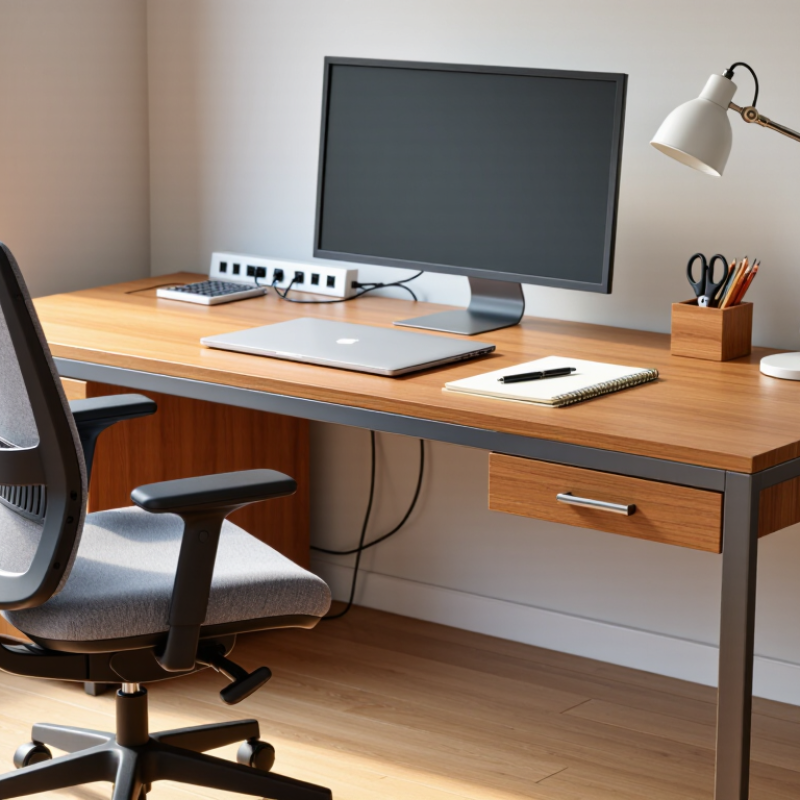
Ergonomics researcher Dr. Alan Hedge offered a useful reminder: “The best posture is the next posture.” This principle matters when choosing a Study Desk. Look for a height that lets your elbows rest near a right angle. Your feet should touch the floor, while the monitor stays close to eye level. A desk around 120 centimeters wide may suit a laptop, notebook, lamp, and small organizer. Measure the available space before buying. It prevents an expensive surprise.

Storage also deserves careful attention. Drawers can hide stationery, but oversized cabinets may reduce legroom. Cable openings help keep chargers from forming a tangled pile. Stable construction matters, especially when the desk holds books or a monitor arm. Materials should be inspected for sharp edges, weak joints, and difficult-to-clean surfaces.

Personal preference still matters. Some users need adjustable height, while others prefer a compact corner desk. No desk solves every problem. Poor lighting, an unsuitable chair, or constant phone alerts can defeat a good setup. I once underestimated how much legroom affects concentration. That mistake is easy to repeat. The best choice comes from observing real habits, checking measurements, and accepting that comfort may matter more than appearance.
What Is a Study Desk and How to Choose the Right One?

What Defines a Study Desk? Purpose, Components, and ISO 9241-5 Principles

What Is a Study Desk and How to Choose the Right One?

A study desk is a work surface designed for reading, writing, drawing, and computer use. Its purpose is not decoration. It should support steady concentration while reducing awkward body positions. A useful desk usually includes a stable top, leg clearance, storage, and space for study tools. Cable openings and a monitor stand can also improve daily use. However, extra features may reduce legroom. More is not always better.

ISO 9241-5 focuses on ergonomic workstation design and postural requirements. It does not provide one perfect desk size for every learner. Instead, it emphasizes adjustability, comfortable reach, adequate clearance, and support for different working positions. Your elbows should rest near the desk surface. Your feet should touch the floor or a footrest. The screen should sit high enough to avoid constant neck bending. Small details matter.

When choosing a desk, measure the user, chair, room, and equipment together. A depth of about 60 to 80 centimeters often gives enough room for a notebook and keyboard, but personal needs differ. Check whether the legs block movement. Press the surface gently; excessive shaking is a warning sign. Rounded edges may feel better during long sessions. Height adjustment is valuable, though it can increase cost and complexity. I have found that a beautiful desk can still feel wrong after thirty minutes. That uncomfortable discovery deserves attention before purchase.

What Defines a Study Desk? Ergonomic Dimension Guide

A study desk should support a neutral posture, adequate work space, comfortable leg clearance, and easy adjustment. The chart shows commonly used ergonomic planning ranges; ISO 9241-5 provides design principles rather than fixed universal dimensions.

How to use this guide: Choose a desk whose height suits your seated posture, whose depth keeps the screen at a comfortable distance, and whose width accommodates your primary study materials. Confirm that the space beneath the desk allows unrestricted movement of the knees and legs.

Choosing Desk Dimensions: Applying the 60–75 cm Depth Ergonomic Benchmark

A study desk should support reading, writing, and screen work without forcing the body forward. In practical use, a depth of 60–75 cm gives most users room for a monitor, keyboard, notebook, and forearms. The exact number is not universal. Body size and equipment matter.

The U.S. Occupational Safety and Health Administration advises placing a monitor at least 20 inches, or about 51 cm, from the eyes. Cornell University’s Ergonomics Web also recommends an arm’s-length viewing distance. These references support the 60–75 cm desk-depth range, especially when a monitor stand or laptop riser is used. A 60 cm desk may feel efficient in a small room. It can feel cramped with two screens. A 75 cm surface provides more adjustment space, but it also encourages clutter.

I once selected a shallow desk because it looked neat in a product photo. My wrists stayed close to the edge, while the screen sat too near. That choice was convenient, but not ergonomic. Measure your monitor depth, keyboard position, and usable arm space before buying. The 2023 U.S. Bureau of Labor Statistics report continues to identify musculoskeletal disorders as a major source of workplace days-away-from-work cases. Desk dimensions cannot solve every posture problem, yet they influence how often users lean, twist, or reach. Leave at least a few centimetres behind the monitor for cables and airflow. Personal testing still matters. Reports guide the choice; your daily posture reveals its weaknesses.

What Is a Study Desk and How to Choose the Right One? — Choosing Desk Dimensions: Applying the 60–75 cm Depth Ergonomic Benchmark

Dimension or Feature Recommended Range Why It Matters Practical Selection Guidance
Desk depth 60–75 cm Provides space for a monitor, keyboard, writing materials, and a comfortable viewing distance without making the desk unnecessarily deep. Choose about 60 cm for compact setups and at least 70–75 cm when using a larger monitor, books, or multiple work materials.
Desk width 100–120 cm for one user Allows a computer setup and basic study materials to remain accessible without excessive reaching. A width near 100 cm suits a laptop or single-monitor setup; 120 cm or more is better for a monitor, notebook, and desk accessories.
Desk height Approximately 71–76 cm for many seated adults Supports a neutral working posture when paired with a correctly adjusted chair. Prioritize adjustable-height legs or a height-adjustable frame if several people will use the desk or if users vary significantly in height.
Monitor viewing distance About 50–75 cm Helps reduce excessive forward leaning and allows the eyes to view the screen comfortably. Use the desk depth to position the monitor far enough away while keeping text readable without leaning toward the screen.
Monitor height Top of screen at or slightly below eye level Encourages a neutral neck position and limits prolonged upward or downward bending. Place the monitor on a stable stand or adjustable arm when the screen is too low on the desktop.
Keyboard and mouse position Close to the front edge; elbows near 90° Helps keep the shoulders relaxed and the wrists in a relatively straight position. Leave sufficient depth for the input devices without forcing the user to reach forward repeatedly.
Clear knee space At least 60 cm wide and 45 cm deep where possible Provides room for the legs to move and reduces contact with drawers, panels, or storage units. Avoid placing fixed supports directly where the knees or feet need to move; check clearance before adding under-desk storage.
Legroom height Approximately 60–70 cm beneath the desktop Allows the user to sit comfortably with adequate space for the thighs and knees. Measure the actual opening under the desk, especially when the desktop has a thick frame, drawers, or a crossbar.
Chair compatibility Seat height adjustable to match the desk A suitable chair helps keep feet supported, knees comfortable, and forearms close to level with the desktop. Select a desk and chair as a pair; if feet do not rest flat after adjustment, use a stable footrest.
Surface thickness and stability Rigid, level, and resistant to noticeable wobble A stable surface improves writing comfort and prevents monitor movement during normal use. Check the frame, joints, and support structure rather than judging stability by desktop thickness alone.
Cable management Dedicated cable space or rear access Keeps cables away from the user's legs and preserves usable desktop space. Choose cable openings or a rear channel that can accommodate power, display, and charging cables without blocking ventilation.
Storage placement Within easy reach but outside primary leg space Frequently used books and supplies can be accessed without repeated twisting or excessive reaching. Prefer side storage or upper shelving positioned safely; avoid filling the area directly beneath the main work surface.

Note: These are practical planning ranges rather than universal requirements. Final dimensions should be adjusted for the user's height, equipment, posture, room size, and preferred working style.

Ergonomic Fit: 90°–110° Elbows, Foot Support, and Adjustable Height

What Is a Study Desk and How to Choose the Right One?
A study desk is more than a flat surface for books and devices. It should support a neutral working posture during reading, writing, and screen use.
EU-OSHA reported that about three in five workers experience musculoskeletal complaints, making daily workstation design worth serious attention. The figure concerns workers, not students, but the warning still matters.

Check your elbows first. They should rest near a 90°–110° angle, with shoulders relaxed and wrists fairly straight.

Desk height should let your forearms float comfortably above the surface, not press into its edge. Adjustable height helps different users share one desk.

It also accommodates growth, which fixed desks often ignore. Small detail, big consequence.

Your feet need support, too. Keep both feet flat on the floor or use a stable footrest. Avoid dangling legs for long sessions.

OSHA workstation guidance also supports neutral joints, suitable screen positioning, and regular posture changes.

A desk cannot correct every habit. I still lean forward when concentrating. That is the part requiring reflection.

Choose a depth that keeps the screen roughly an arm’s length away, while leaving space for a notebook.

Before buying, measure your chair, elbow height, and leg clearance. Then test the desk for ten quiet minutes. Comfort that survives silence is more convincing than showroom appearance.

Materials and Stability: Comparing BIFMA Durability and Load-Test Standards

What Is a Study Desk and How to Choose the Right One?

A study desk should resist daily pressure, not only look attractive. The ANSI/BIFMA X5.5-2021 standard evaluates desk products through stability, strength, durability, and functional tests. These tests may include repeated loading, horizontal force, and component performance. They imitate years of movement better than a single showroom weight test.

A high-quality desk should not wobble when writing, leaning, or opening a drawer. Steel frames usually provide strong support, while laminated wood panels offer practical scratch resistance. Solid wood feels substantial, but moisture changes can cause movement. The BIFMA standard is a testing benchmark, not a guaranteed personal load limit. A desk can pass testing and still feel wrong in a small room. That part is easy to miss. The U.S. Bureau of Labor Statistics reported that musculoskeletal disorders represented 27% of private-industry days-away-from-work cases in 2022. Desk height and stability deserve attention.

Tips: Check the product’s tested load, not only its advertised capacity. Press gently on each corner and observe movement. Look for reinforced joints, levelers, and a thick work surface. If possible, test the desk while seated. Your elbows should rest near a right angle, although real bodies vary. Avoid assuming heavier always means safer; poor joints can weaken an otherwise solid frame. When documentation is unclear, choose verified test information over attractive specifications.

Screen Setup and Safety: OSHA’s Recommended 50–70 cm Viewing Distance

A study desk is more than a flat surface for books and a computer. It should support a stable posture, clear vision, and easy movement. For screen work, viewing distance deserves special attention. OSHA guidance is often applied as a practical range of about 50–70 cm from your eyes to the screen. That is roughly an arm’s length, but body size and screen dimensions can change the comfortable position.

Place the monitor directly in front of you. Its top edge should sit near eye level, or slightly below it. Your eyes should look gently downward toward the middle of the display. Keep the screen far enough away to avoid leaning forward. Too close causes visual strain. Too far may encourage squinting.

Measure it once.

A desk with enough depth helps maintain this distance without pushing the keyboard too far away. Your elbows should remain near your sides, with relaxed shoulders and supported feet. Reduce glare from windows and bright lamps. Adjust brightness to match the room, not to overpower it. A practical check is simple: after twenty minutes, notice your neck, eyes, and shoulders. If they feel tense, the setup needs revision.

The 50–70 cm range is useful, not absolute. My own layout might look correct while still encouraging poor posture during long sessions. That is an important limitation. Move the screen, chair, or desk in small steps, then reassess. Comfort should be tested, not assumed.

Copyright 2025 Fluidra S.A. | Created by BCM Marketing Agencia Privacy Policy Legal note | Cookie policy |

Technical cookies are strictly necessary for our website to work and you can navigate through it. These types of cookies are those that, for example, allow us to identify you, give you access to certain restricted parts of the page if necessary, or remember different options or services already selected by you, such as your privacy preferences. Therefore, they are activated by default, your authorization not being necessary in this regard. Through the configuration of your browser, you can block or alert the presence of this type of cookies, although such blocking will affect the proper functioning of the different functionalities of our website.


The analysis cookies allow us to study the navigation of the users of our website in general (for example, which sections of the page are the most visited, which services are used most and if they work correctly, etc.). From the statistical information on navigation on our website, we can improve both the operation of the page itself and the different services it offers. Therefore, these cookies do not have an advertising purpose, but only serve to make our website work better, adapting to our users in general. By activating them you will contribute to this continuous improvement. You can enable or disable these cookies by checking the corresponding box, being disabled by default.


Functionality cookies allow us to remember your preferences, to personalize certain characteristics and general options of our website, every time you access it (for example, the language in which the information is presented to you, the sections marked as favorites, your browser type, etc.) Therefore, this type of cookies does not have an advertising purpose, but by activating them you will improve the functionality of the website (for example, adapting to your type of browser) and the customization of it based on your preferences (for example, by presenting the information in the language that you have chosen in previous occasions), which will contribute to the ease, usability and comfort of our page during your navigation. You can enable or disable these cookies by checking the corresponding box, being disabled by default.


Advertising cookies allow us to manage the advertising spaces included in our website based on criteria such as the content shown or the frequency in which the ads are displayed. For example, if you have been shown the same ad several times on our website, and you have not shown a personal interest by clicking on it, it will not appear again. In summary, by activating this type of cookies, the advertising shown on our website will be more useful and diverse, and less repetitive. You can enable or disable these cookies by checking the corresponding box, being disabled by default.


Behavioral advertising cookies allow us to obtain information based on the observation of your browsing habits and behaviors on the web, in order to show you advertising content that best suits your personal tastes and interests. To understand it in a very simple way, we will give you a fictitious example: if your last searches on the web were related to suspense literature, we would show you advertising about suspense books. Therefore, activating this type of cookies, the advertising that we show you on our website will not be generic, but will be oriented to your searches, tastes and interests, therefore adjusting exclusively to you. You can enable or disable these cookies by checking the corresponding box, being disabled by default.
To understand it in a very simple way, we will give you a fictitious example: if your last searches on the web were related to suspense literature, we would show you advertising about suspense books. Therefore, activating this type of cookies, the advertising that we show you on our website will not be generic, but will be oriented to your searches, tastes and interests, therefore adjusting exclusively to you. You can enable or disable these cookies by checking the corresponding box, being disabled by default.

SAVE

We use our own and third-party cookies to ensure the proper functioning of the website and to analyse our services, improve your experience on our website and show you advertisements related to your interests according to profiling based on your browsing habits (e.g. websites visited). You can accept all cookies by clicking "ACCEPT" or set or reject them by clicking here. If you would like to know more about the use of cookies, please see our COOKIE POLICY.


ACCEPT ALL
Reject no essentials