How to Choose a Managed Network Switch?
FLUID HANDLING EXPERTS

Blog, all our news

How to Choose a Managed Network Switch?

A reliable network rarely draws attention until a video call freezes, a payment terminal disconnects, or a new access point needs power. Choosing the right Managed Network Switch helps prevent small network issues from becoming costly disruptions. Uptime Institute’s 2024 Annual Outage Analysis found that 54% of respondents reported costs above $100,000 from their latest significant outage. That is not a switch-only problem. Still, network visibility matters. IBM’s 2024 Cost of a Data Breach Report placed the global average breach cost at $4.88 million. That figure covers breaches broadly, not switch failures, but it underscores why access control and monitoring deserve careful planning.

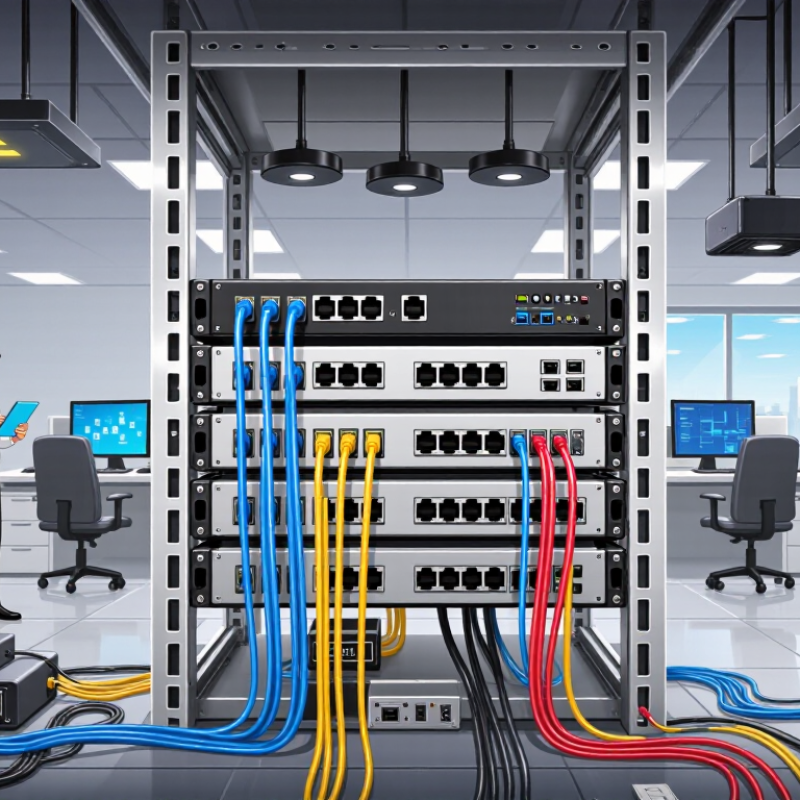
A good selection starts with the work the network must support, not the largest port count on a product sheet. Count current devices, then estimate growth across offices, cameras, phones, and wireless access points. For a small office, quiet operation and straightforward VLAN setup may matter most. A warehouse may need rugged hardware, PoE capacity, and reliable uplinks between floors. Check port speed, switching capacity, management options, redundancy, and support terms. PoE budgets deserve particular attention: a switch can have enough ports yet lack power for every connected device. Ask whether the team needs a cloud dashboard, local controls, or both. It is easy to overvalue advanced features that nobody will maintain. That deserves an honest pause. The right choice balances security, performance, skills, and budget, while leaving room for realistic growth.
How to Choose a Managed Network Switch?

Identify Your Network Requirements and Expected Growth

How to Choose a Managed Network Switch?

Identify Your Network Requirements and Expected Growth

Start with a simple map of the devices that need connections. Count computers, wireless access points, cameras, phones, printers, and servers. Note which devices need power through Ethernet. A small office may have 24 active connections today, but conference rooms or new access points can quickly use spare ports. Leave room.

Estimate the traffic each area will generate. Video calls, large file transfers, and camera feeds can create different demands from basic web browsing. Check the switch’s port speeds and uplink capacity against your busiest connections. Also consider whether you need network segmentation, remote monitoring, or traffic prioritization. These features can help organize operations, but they add configuration work.

Growth estimates are rarely exact. Plan for likely changes over the next few years, rather than buying capacity for every imaginable scenario. Compare the cost of extra ports with the disruption of replacing a switch early. Keep a written record of current devices, occupied ports, and expected additions. Revisit it when teams move, equipment changes, or usage starts to feel slower. A spreadsheet is enough. Don’t treat it as a forecast carved in stone.

Compare Port Count, Port Types, and Switching Speeds

Choosing a managed network switch starts with counting active devices, not guessing from today’s setup. A small office with 18 computers may also need ports for printers, wireless access points, cameras, and future desks. Add roughly 20–30 percent spare capacity, since unused ports are cheaper than replacing a full switch later. Leave room.

Next, compare port types and speeds. Standard copper Ethernet ports suit most nearby devices, while fiber ports can connect distant rooms or separate buildings. Some switches use dedicated SFP or SFP+ uplinks; check whether those slots are included in the advertised port count. A 1 Gbps access port is often enough for office PCs, but Wi-Fi 6 access points, storage servers, and video workloads may benefit from 2.5 or 10 Gbps connections. The uplink speed matters too: several busy ports feeding one slow uplink can create a bottleneck. I have seen a tidy port-count choice feel inadequate once backups run. It is worth checking actual traffic rather than assuming every device needs the fastest option.

Tips: Sketch the devices and cable paths before buying. Confirm copper or fiber compatibility, PoE needs, and uplink capacity. Keep a little headroom; estimates are imperfect, and that is normal.

Evaluate Management, Security, and VLAN Features

How to Choose a Managed Network Switch?

Evaluate Management, Security, and VLAN Features

A managed switch should make everyday network changes visible and controllable. Check whether its interface shows port status, traffic errors, and connected devices without several layers of menus. Remote access through secure protocols can help, while event logs and monitoring support faster troubleshooting. Keep it practical. If routine tasks require a specialist every time, the interface may not suit your team.

Security features deserve close attention. Look for access controls such as port-based authentication, configurable access control lists, and protections against unused ports being connected casually. Secure management access and a clear firmware update process matter too. A long feature list is not automatically safer; settings must be maintained. It is easy to overvalue advanced options and overlook who will review alerts on a busy Monday.

VLAN support helps separate groups such as staff, guests, cameras, and voice devices. Confirm that the switch supports the VLAN count and tagging options your network needs, then check how those settings work with the router and other switches. A mislabeled trunk port can quietly disrupt several rooms. Document VLAN IDs and port assignments before rollout. The spreadsheet may feel fussy, but it saves guesswork later. Test one small area first, and revisit the design when devices or teams change.

Check Power Delivery, Reliability, and Compatibility

A managed network switch should match the devices it will power, the traffic it will carry, and the environment where it will operate. For Power over Ethernet, check both the supported standard and the total power budget. A switch may offer enough power per port but still fall short when many cameras or access points run together. Leave headroom for peak demand. Also consider airflow, operating temperature, and whether the unit will sit in a warm cabinet. Small details matter.

Tips: List every powered device and its maximum draw. Compare that total with the switch’s usable PoE budget, not just its advertised per-port limit. Keep a little spare capacity. Test before deployment.

Reliability depends on more than a product’s uptime claim. Check for useful monitoring, event logs, configuration backups, and recovery options after a power interruption. If downtime would disrupt work, assess whether redundant power or network paths are practical for your setup. Compatibility deserves the same care: confirm port speeds, VLAN support, management protocols, and any fiber modules you need. Older devices may negotiate at lower speeds, and a mismatched module can cause frustrating link problems. I have seen planning spreadsheets miss one small endpoint; it is worth checking the actual device list again before ordering.

Plan Installation, Monitoring, and Ongoing Support

A managed network switch is only useful when its installation fits the real site. Before mounting it, map cable routes, power outlets, ventilation, and the devices each port will serve. A crowded cabinet can trap heat, while a cable that barely reaches may become a maintenance problem later. Label both ends of every cable. Keep it documented. Record the switch’s location, port assignments, and configuration backup in a place the support team can access.

Plan monitoring before the network gets busy. Track port status, traffic levels, error counts, and device temperature, then set alerts for changes that need attention. A spike in errors on one port may point to a damaged cable, not a failing switch. Review alerts against normal work patterns; otherwise, routine activity can create noise. Test notifications with a safe, planned change. One missed alert is an uncomfortable lesson.

Ongoing support needs clear ownership. Decide who can change configurations, who reviews access, and how urgent faults reach the right person. Schedule firmware reviews and configuration backups, but test updates on a low-risk switch or maintenance window when possible. Keep a simple recovery checklist near the network records. In practice, teams often overlook spare cables and replacement power supplies. That happens. Check what is actually on hand, and note response times that your team can realistically meet.

How to Choose a Managed Network Switch? — Plan Installation, Monitoring, and Ongoing Support

Planning Phase Decision Area What to Check Practical Guidance Useful Evidence
Before purchase Port count and growth Count current wired endpoints, uplinks, and devices likely to be added during the planning period. Allow spare ports for growth and maintenance. Check whether the switch needs copper, fiber, or a mix of port types. Port inventory; growth forecast
Before purchase Network capacity Review access-port speeds, uplink speeds, switching capacity, and expected traffic between ports. Match interface speeds to connected devices and upstream equipment. Confirm that uplinks will not become a bottleneck for expected traffic. Traffic estimates; topology diagram
Before purchase Power over Ethernet Identify powered devices, their PoE standards and maximum power needs, plus the switch’s total PoE budget. Check both per-port limits and the total power budget; include headroom for simultaneous device demand and future additions. Device power list; PoE budget calculation
Before purchase Layer 2 and Layer 3 features Determine whether requirements include VLANs, link aggregation, spanning tree, routing, access control, or quality of service. Select features based on the network design and staff expertise. Verify that required capabilities are supported in the intended operating mode. Requirements checklist; design review
Before purchase Resilience and environment Assess power protection, cooling, rack space, operating conditions, and the impact of a switch outage. Consider redundant power or links where downtime impact warrants them. Confirm rack depth, airflow clearance, and suitable power circuits. Site survey; resilience plan
Installation Configuration and security Plan management addressing, administrator access, VLAN assignments, firmware, logging, and configuration backup. Use unique administrator credentials, restrict management access, document approved settings, and back up the configuration after changes. Configuration record; backup copy
Installation Change and cutover plan Identify dependencies, affected users, maintenance window, rollback steps, and tests for critical services. Test configuration before cutover where practical. Record cable and port mappings, validate connectivity, and keep a documented rollback path. Change plan; test checklist
Monitoring Health and performance Track device availability, port status, link errors, utilization, temperature, power supply status, and PoE consumption where available. Set alert thresholds that reflect normal operating patterns. Review trends as well as individual alerts to identify capacity or reliability issues. Monitoring dashboard; alert history
Monitoring Logs and visibility Check whether the switch can send event logs and expose operational metrics to the organization’s monitoring tools. Centralize relevant logs, synchronize device time, and define who reviews alerts and how urgent events are escalated. Logging configuration; escalation path
Ongoing support Maintenance and firmware Establish a process to review security advisories, assess updates, test changes, and schedule maintenance. Keep a current inventory and configuration backup. Apply updates through a documented process that includes testing and rollback planning. Maintenance calendar; update records
Ongoing support Ownership and recovery Assign responsibility for troubleshooting, access management, spare equipment, support escalation, and recovery documentation. Document support contacts and response expectations. Periodically verify that a saved configuration can be restored and that recovery steps are current. Support runbook; recovery test record
Copyright 2025 Fluidra S.A. | Created by BCM Marketing Agencia Privacy Policy Legal note | Cookie policy |

Technical cookies are strictly necessary for our website to work and you can navigate through it. These types of cookies are those that, for example, allow us to identify you, give you access to certain restricted parts of the page if necessary, or remember different options or services already selected by you, such as your privacy preferences. Therefore, they are activated by default, your authorization not being necessary in this regard. Through the configuration of your browser, you can block or alert the presence of this type of cookies, although such blocking will affect the proper functioning of the different functionalities of our website.


The analysis cookies allow us to study the navigation of the users of our website in general (for example, which sections of the page are the most visited, which services are used most and if they work correctly, etc.). From the statistical information on navigation on our website, we can improve both the operation of the page itself and the different services it offers. Therefore, these cookies do not have an advertising purpose, but only serve to make our website work better, adapting to our users in general. By activating them you will contribute to this continuous improvement. You can enable or disable these cookies by checking the corresponding box, being disabled by default.


Functionality cookies allow us to remember your preferences, to personalize certain characteristics and general options of our website, every time you access it (for example, the language in which the information is presented to you, the sections marked as favorites, your browser type, etc.) Therefore, this type of cookies does not have an advertising purpose, but by activating them you will improve the functionality of the website (for example, adapting to your type of browser) and the customization of it based on your preferences (for example, by presenting the information in the language that you have chosen in previous occasions), which will contribute to the ease, usability and comfort of our page during your navigation. You can enable or disable these cookies by checking the corresponding box, being disabled by default.


Advertising cookies allow us to manage the advertising spaces included in our website based on criteria such as the content shown or the frequency in which the ads are displayed. For example, if you have been shown the same ad several times on our website, and you have not shown a personal interest by clicking on it, it will not appear again. In summary, by activating this type of cookies, the advertising shown on our website will be more useful and diverse, and less repetitive. You can enable or disable these cookies by checking the corresponding box, being disabled by default.


Behavioral advertising cookies allow us to obtain information based on the observation of your browsing habits and behaviors on the web, in order to show you advertising content that best suits your personal tastes and interests. To understand it in a very simple way, we will give you a fictitious example: if your last searches on the web were related to suspense literature, we would show you advertising about suspense books. Therefore, activating this type of cookies, the advertising that we show you on our website will not be generic, but will be oriented to your searches, tastes and interests, therefore adjusting exclusively to you. You can enable or disable these cookies by checking the corresponding box, being disabled by default.
To understand it in a very simple way, we will give you a fictitious example: if your last searches on the web were related to suspense literature, we would show you advertising about suspense books. Therefore, activating this type of cookies, the advertising that we show you on our website will not be generic, but will be oriented to your searches, tastes and interests, therefore adjusting exclusively to you. You can enable or disable these cookies by checking the corresponding box, being disabled by default.

SAVE

We use our own and third-party cookies to ensure the proper functioning of the website and to analyse our services, improve your experience on our website and show you advertisements related to your interests according to profiling based on your browsing habits (e.g. websites visited). You can accept all cookies by clicking "ACCEPT" or set or reject them by clicking here. If you would like to know more about the use of cookies, please see our COOKIE POLICY.


ACCEPT ALL
Reject no essentials