How to Choose the Right Display Screen for Your Business?
FLUID HANDLING EXPERTS

Blog, all our news

How to Choose the Right Display Screen for Your Business?

Choosing the right Display Screen can shape how customers notice, understand, and remember your business. A bright screen beside a sunlit shop window needs different features from one mounted in a quiet meeting room. Size matters, but it is only part of the decision. You also need to consider viewing distance, ambient light, content, operating hours, and how often the display will be updated.

Start with the job the screen must do. A menu board may need clear text and easy content changes, while a reception display might prioritize a polished image and reliable daily operation. Check resolution against screen size and viewing distance; extra pixels are not always useful from across a lobby. Compare brightness, connectivity, mounting options, warranty terms, and expected maintenance. Ask suppliers for specifications in writing, then view the screen in lighting similar to your own space. Small details count. Glare can wash out a message. A remote control may be inconvenient when the screen sits high on a wall.

Budget for more than the purchase price. Installation, content software, energy use, and replacement parts can affect long-term value. There is no single best screen for every business, and product claims deserve careful checking. I would not choose from a brochure alone. Match the display to real tasks, test it where possible, and leave room to revise your plan. The right choice should make information easier to see—not simply add another bright object to the room.
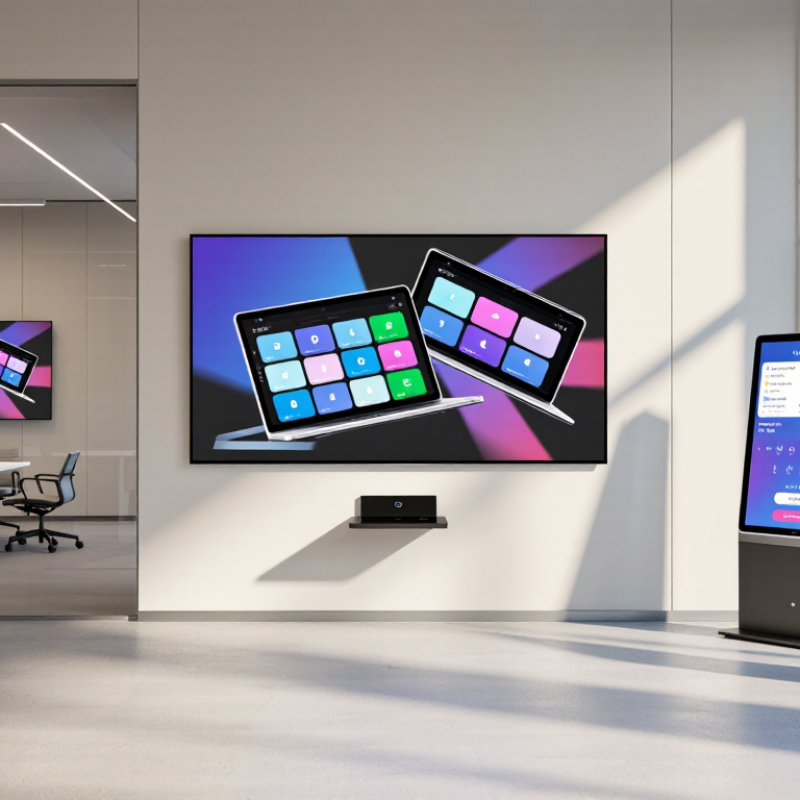
How to Choose the Right Display Screen for Your Business?

Understanding the Role of Display Screens in Business

A display screen is more than a bright surface on a wall. It can guide visitors, explain a service, or share timely information with staff. Its value depends on what people need to understand at that moment. A screen near reception might show room directions, while one beside a product display can clarify features without requiring a salesperson nearby. Keep the message readable from the actual viewing distance. Small text that looks fine on a laptop may disappear across a busy lobby.

The role of business displays is growing alongside digital out-of-home advertising. The IAB’s 2023 Internet Advertising Revenue Report recorded U.S. digital out-of-home revenue of about $2.9 billion, up 11.6% from 2022. That figure reflects advertising investment, not proof that every screen improves business results. A 2009 Arbitron study found that 70% of surveyed Americans recalled seeing a digital place-based video screen in the previous month; 47% recalled an advertisement on one. The findings are useful context, but they are dated and may not represent every audience or setting.

Start with the task, not the hardware. A screen used for changing promotions may need easy content updates; a wayfinding display needs clear layouts and dependable operation. Think about glare from windows, viewing angles, and whether people pause or keep walking. Then measure outcomes, such as fewer repeated questions or more visitors reaching a service desk. Not every message belongs on a screen. Some do.

How to Choose the Right Display Screen for Your Business? - Understanding the Role of Display Screens in Business

Display Type Typical Brightness Best-Suited Business Use Key Advantages Points to Consider
Indoor LCD or LED-backlit LCD Approximately 250–500 cd/m² Offices, meeting rooms, classrooms, and indoor information displays Clear images in controlled lighting; widely available in a range of sizes and resolutions Strong ambient light or direct sunlight can make content harder to see. Confirm operating hours and warranty terms for commercial use.
Commercial high-brightness display Often approximately 500–1,000 cd/m², depending on model Bright retail areas, transit facilities, and spaces with substantial ambient light Improved visibility in brighter indoor environments; commercial models may support extended operating schedules Higher brightness can increase power use and heat. Match the specification to the actual light levels and viewing distance.
Outdoor digital signage display Often approximately 1,500–3,000 cd/m² or higher Outdoor advertising, storefronts, transport information, and exposed public areas Designed for visibility in daylight; outdoor-rated units may include weather protection and temperature management Check the specified ingress-protection rating, temperature range, sunlight readability, ventilation, and local installation requirements.
Interactive touchscreen display Commonly approximately 300–500 cd/m² Self-service kiosks, collaborative meeting rooms, wayfinding, and customer check-in Enables direct user input and can combine instructions, forms, and interactive content on one screen Choose a suitable touch technology and screen size. Plan for accessibility, cleaning, network security, and regular software updates.
Video wall Varies by panel; commonly about 500–1,000 cd/m² for indoor installations Control rooms, large venues, corporate lobbies, and high-impact retail presentations Creates a large-format canvas from multiple panels and can show one image or several content zones Consider bezel visibility, panel alignment, viewing distance, mounting structure, heat, and the processor needed to manage content.
OLED display Varies by panel and content; check the manufacturer’s specifications Premium retail presentations, reception areas, and spaces where deep blacks and contrast matter High contrast and wide viewing angles; individual pixels can switch off to produce black Assess brightness for the room, expected daily runtime, static-content exposure, and the manufacturer’s guidance on image retention.
E-paper display Reflective technology; typically specified for ambient-light readability rather than backlight brightness Price labels, schedules, room signs, and low-refresh information displays Low energy use when content changes infrequently; remains readable in many well-lit settings Refresh is generally slower than on video displays, and color, update speed, and low-light visibility depend on the specific device.

Selection note: Brightness figures are indicative ranges, not universal standards. Compare measured specifications for the exact model, and consider viewing distance, ambient light, content type, operating hours, connectivity, and total installation cost before purchasing.

Identifying Your Business Needs and Viewing Environment

Before comparing display specifications, write down what the screen must do during an ordinary workday. A reception display may show appointment details from several metres away, while a staff monitor needs readable text at close range. Note who will watch, how many people will gather, and whether content changes often. These details affect screen size, resolution, and installation height. A screen that looks impressive in a showroom may feel awkward above a busy counter.

Then inspect the viewing environment at the times the display will be used. Measure the distance from the nearest and farthest viewers, and check for windows, overhead lights, and reflections on the wall. Bright daylight can wash out a dim image; evening lighting may make an overly bright screen uncomfortable. Consider how long the display stays on, too. A menu board running all day has different demands from a meeting-room screen used for an hour. Take a few photos from typical viewing positions. They can reveal glare or blocked sightlines that measurements miss.

Be honest about what you do not know yet. If staff disagree about viewing distance, mark the range rather than guessing one number. I have seen plans change after a chair, queue, or display stand shifted the sightline. Test proposed content at its real size, including small text and charts. Check again from the back of the room. Then match the screen’s brightness and size to those observed conditions, not just to a specification sheet.

Comparing Display Types, Sizes, and Technical Specifications

How to Choose the Right Display Screen for Your Business?

Comparing Display Types, Sizes, and Technical Specifications

Start with the viewing distance and room lighting, not the screen’s largest advertised number. A bright shop window facing afternoon sun needs more brightness than a shaded meeting room. For indoor use, compare measured brightness in nits and check whether the image stays clear from the sides. Test it at the actual viewing angle. Small details matter.

LCD screens suit many everyday settings, including reception areas and meeting rooms. LED displays can work well for large, vivid visuals, though installation and content needs may be more demanding. For close viewing, resolution affects how crisp text and fine lines appear. Match it to screen size and audience distance; a high resolution alone cannot fix poor placement. Touch capability is useful for interactive directories, but adds cost and may need more frequent cleaning.

Measure the wall or stand before comparing diagonal sizes. A 55-inch screen can feel oversized in a narrow corridor, while a smaller panel may disappear across a spacious lobby. Check aspect ratio, available connections, operating temperature, and rated hours of use. These specifications reveal practical limits. Ask how the screen will be managed and whether it can run scheduled content. Then view sample material on-site, if possible. Specifications can look tidy on paper. Real rooms are less predictable, and I would leave room in the budget for mounting and setup.

Assessing Connectivity, Installation, and Ongoing Costs

Before choosing a display, list the devices it must connect to: laptops, media players, cameras, or room-control systems. Check the actual ports and signal requirements, not just the product description. A screen with several inputs may still need adapters, extra cables, or a separate control unit. Test the setup with your own equipment when possible. Small details matter.

Installation can change the real cost. A large screen may need reinforced mounting, careful cable routing, and access to power nearby. Measure the wall and viewing distance, then check whether staff can reach controls and service points safely. In a meeting room, glare from a window can make a technically suitable display hard to read. We once overlooked this in a planning estimate. It was an avoidable miss.

Budget beyond the purchase price. Include installation labor, mounts, cabling, electricity, cleaning, repairs, and eventual replacement. Ask how long key components are expected to last and whether routine servicing requires specialist help. For a screen used all day, a modest difference in energy use can add up over several years. Compare realistic operating hours, not ideal figures. Keep a contingency for unexpected work, because older buildings often hide awkward wiring or limited outlets.

Selecting the Screen That Best Fits Your Business Use case

Choosing a display begins with the job it must do, not the largest screen that fits the wall. A menu board near a sunny window needs higher brightness than a screen in a dim meeting room. For a reception area, viewers may stand several metres away, so large text and clear contrast matter more than fine detail. Walk the space at different times of day. Sunlight changes the picture.

Consider how people will interact with the screen. A presentation display may need sharp text and reliable connections, while a self-service kiosk needs responsive touch and a surface that is easy to clean. Check viewing distance, portrait or landscape orientation, daily operating hours, and how staff will update content. These details are easy to overlook. They can shape the whole experience.

It is tempting to compare models by resolution alone, but that rarely settles the choice. Measure the available wall space, note nearby light sources, and test sample content from the places customers will actually stand. Also ask who will handle installation and routine maintenance. A screen that looks right on paper may feel too bright, too small, or awkwardly placed in the real space. There is no perfect checklist; sometimes the best decision needs a second look after a site visit.

How to Choose the Right Display Screen for Your Business?

Typical brightness targets vary with ambient light. Use these indicative values as a starting point, then consider viewing distance, screen size, content, and local lighting conditions.

Article Source:

Copyright 2025 Fluidra S.A. | Created by BCM Marketing Agencia Privacy Policy Legal note | Cookie policy |

Technical cookies are strictly necessary for our website to work and you can navigate through it. These types of cookies are those that, for example, allow us to identify you, give you access to certain restricted parts of the page if necessary, or remember different options or services already selected by you, such as your privacy preferences. Therefore, they are activated by default, your authorization not being necessary in this regard. Through the configuration of your browser, you can block or alert the presence of this type of cookies, although such blocking will affect the proper functioning of the different functionalities of our website.


The analysis cookies allow us to study the navigation of the users of our website in general (for example, which sections of the page are the most visited, which services are used most and if they work correctly, etc.). From the statistical information on navigation on our website, we can improve both the operation of the page itself and the different services it offers. Therefore, these cookies do not have an advertising purpose, but only serve to make our website work better, adapting to our users in general. By activating them you will contribute to this continuous improvement. You can enable or disable these cookies by checking the corresponding box, being disabled by default.


Functionality cookies allow us to remember your preferences, to personalize certain characteristics and general options of our website, every time you access it (for example, the language in which the information is presented to you, the sections marked as favorites, your browser type, etc.) Therefore, this type of cookies does not have an advertising purpose, but by activating them you will improve the functionality of the website (for example, adapting to your type of browser) and the customization of it based on your preferences (for example, by presenting the information in the language that you have chosen in previous occasions), which will contribute to the ease, usability and comfort of our page during your navigation. You can enable or disable these cookies by checking the corresponding box, being disabled by default.


Advertising cookies allow us to manage the advertising spaces included in our website based on criteria such as the content shown or the frequency in which the ads are displayed. For example, if you have been shown the same ad several times on our website, and you have not shown a personal interest by clicking on it, it will not appear again. In summary, by activating this type of cookies, the advertising shown on our website will be more useful and diverse, and less repetitive. You can enable or disable these cookies by checking the corresponding box, being disabled by default.


Behavioral advertising cookies allow us to obtain information based on the observation of your browsing habits and behaviors on the web, in order to show you advertising content that best suits your personal tastes and interests. To understand it in a very simple way, we will give you a fictitious example: if your last searches on the web were related to suspense literature, we would show you advertising about suspense books. Therefore, activating this type of cookies, the advertising that we show you on our website will not be generic, but will be oriented to your searches, tastes and interests, therefore adjusting exclusively to you. You can enable or disable these cookies by checking the corresponding box, being disabled by default.
To understand it in a very simple way, we will give you a fictitious example: if your last searches on the web were related to suspense literature, we would show you advertising about suspense books. Therefore, activating this type of cookies, the advertising that we show you on our website will not be generic, but will be oriented to your searches, tastes and interests, therefore adjusting exclusively to you. You can enable or disable these cookies by checking the corresponding box, being disabled by default.

SAVE

We use our own and third-party cookies to ensure the proper functioning of the website and to analyse our services, improve your experience on our website and show you advertisements related to your interests according to profiling based on your browsing habits (e.g. websites visited). You can accept all cookies by clicking "ACCEPT" or set or reject them by clicking here. If you would like to know more about the use of cookies, please see our COOKIE POLICY.


ACCEPT ALL
Reject no essentials