How to Choose the Best TrueNAS Server in 2026?
FLUID HANDLING EXPERTS

Blog, all our news

How to Choose the Best TrueNAS Server in 2026?

Choosing the best True Nas Server in 2026 starts with your workload, not a processor benchmark. A home media library, virtual machines, and business backups place very different demands on hardware. That matters. Before comparing models, estimate usable storage, expected growth, client count, and network speed.

Then check drive-bay capacity, memory expandability, supported network interfaces, and room for future upgrades. ZFS can benefit from ample memory, while drive layout and redundancy choices affect usable capacity and recovery options. These details are easy to overlook. Look beyond headline specifications. Confirm that the platform is supported by current TrueNAS hardware guidance, and review component compatibility and firmware support. Also consider idle power, cooling noise, warranty terms, and replacement-part availability; a server runs long after setup. Small details matter.

A compact system may suit a quiet home, while heavier workloads can justify more bays, faster networking, and serviceable parts. Still, bigger is not automatically better. Overbuying raises cost and power use, while an undersized system can limit future growth. This guide compares practical options by workload, budget, expandability, and reliability rather than treating one build as universal. Exact needs vary, and compatibility can change. Use the checklist as a starting point, then verify current specifications before purchase.
How to Choose the Best TrueNAS Server in 2026?

Define Your Storage, Performance, and Availability Requirements

Start with the data you need to store, not the largest drive count you can afford. List current files, expected growth, and retention periods for projects, backups, and snapshots. Then estimate usable capacity after redundancy and filesystem overhead; raw drive totals can look reassuring while usable space is much lower. Leave room. A nearly full pool can make routine growth and maintenance harder. If your estimates feel uncertain, record the assumptions and revisit them after a few months of real use.

Performance depends on the work the server will handle. A home media library mostly needs steady sequential reads, while several people editing large files may need faster networking and stronger sustained write performance. Virtual machines and databases often benefit from low latency and many small, simultaneous operations. Numbers can mislead. Test a representative workload, including busy periods, rather than relying only on peak specifications. Availability is a separate requirement: decide how long the system can be offline and how much data loss is acceptable. Redundant drives can keep some failures from interrupting access, but they are not a backup. Plan independent backups, monitoring, replacement procedures, and recovery tests. A recovery plan that has never been tested is still an assumption.

Compare TrueNAS Editions and Server Form Factors

Compare editions by support, not labels alone. A community edition can suit a home lab or small office that accepts self-managed updates. A commercially supported edition may offer validated hardware, longer support windows, and faster help during a storage failure. Check current release notes and feature limits; edition names and terms can change. IDC’s Data Age 2025 forecast estimated that global data creation and replication would reach 175 zettabytes. That projection is not a sizing formula, but it highlights why growth headroom matters.

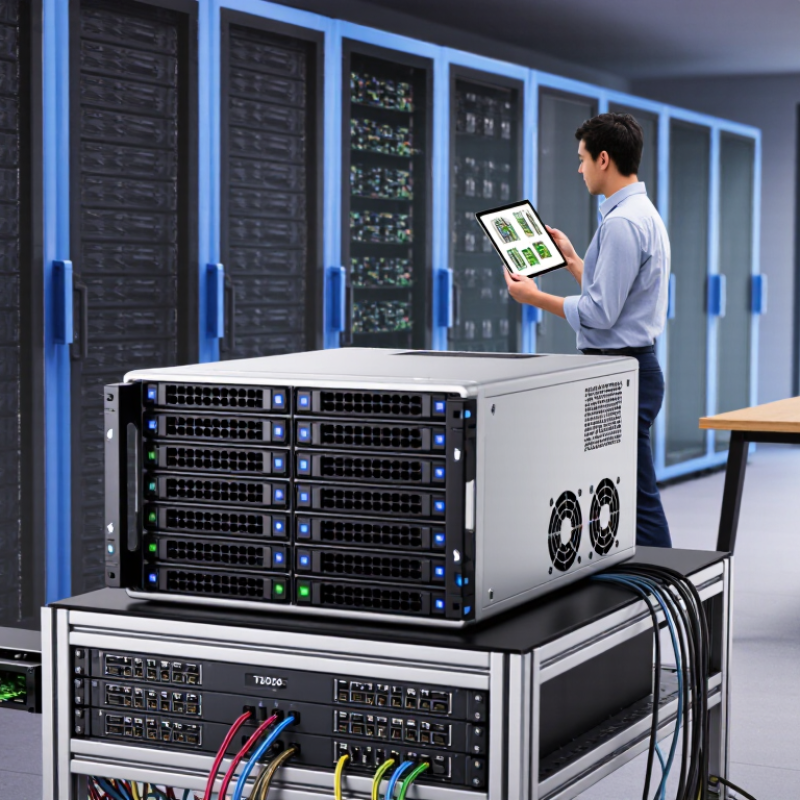
Form factor determines where the server fits and how it can expand. A tower is often easier to place beside a workstation and may be quieter. A short-depth rack unit can suit a shallow cabinet, while a full-depth chassis may offer more drive bays and airflow. Count usable bays, not just advertised capacity. Leave room for parity, snapshots, and future disks. Also check power draw, cooling, noise, and whether the network interface matches your workload. A dense rack server can be a poor choice in a warm closet.

Tip: List current data, annual growth, and backup needs before comparing models. Check memory compatibility and drive support against official documentation. I would still leave spare bays; expansion plans are often too optimistic.

Select Compatible CPU, Memory, and Network Hardware

How to Choose the Best TrueNAS Server in 2026?

Choose a CPU for the work your server will actually do. File sharing needs less processing power than encryption, virtual machines, or media conversion. Favor a processor with enough cores for planned tasks, but check motherboard support and power use. More cores are not always better. A fast processor cannot fix a slow storage layout.

Memory matters for ZFS, but capacity depends on workload and pool size. Choose a motherboard and memory configuration that support your required capacity; ECC memory is a sensible option when supported. Check the platform’s specifications before buying, and leave room for future expansion. I might be tempted to spend heavily here, but measured needs are a better guide.

Tips: Match network speed to your clients, switch, and storage. A faster network port helps only when the rest of the path can keep up. Confirm driver support, PCIe slot availability, and cooling clearance before ordering parts. Test the system with real file transfers; a quiet test bench can hide a bottleneck. Some early choices may need revision. That is useful feedback.

How to Choose TrueNAS Network Hardware in 2026

The chart compares theoretical maximum throughput for common Ethernet link speeds. Actual file-transfer speeds are lower and depend on protocol overhead, storage devices, CPU performance, and the rest of the network. Choose a link speed that your server, switch, and clients can all support.

Plan Drive Layout, Redundancy, and Expansion

Start with the data, not the number of drive bays. Estimate current usable capacity, then allow for three to five years of growth, snapshots, and temporary files. An office storing 18 TB today may need much more once camera footage and project versions accumulate. Do not plan around every advertised terabyte. Capacity math is unglamorous. It matters. Leave a little slack.

Choose redundancy based on drive size, rebuild time, and the cost of downtime. Mirroring is simple to understand and can make replacement planning easier, but it uses more raw capacity. Parity layouts use space efficiently, while a failed drive can leave a large array vulnerable during recovery. For important data, consider dual-parity protection and keep a separate, tested backup. Redundancy is not a backup. Test restores, not just alerts.

Plan each storage group as a unit. Adding one drive later may not increase usable space as expected, depending on the layout and software version. Check current expansion rules before buying, and leave open bays or budget for a separate expansion shelf. Matching drive sizes can simplify planning, though it is not always the cheapest choice. I would rather leave capacity unused than discover the layout cannot grow cleanly. The trade-off deserves a second look.

How to Choose the Best TrueNAS Server in 2026? - Plan Drive Layout, Redundancy, and Expansion

Planning Dimension Practical Guidance Example or Trade-Off
Workload and priority Estimate how much usable capacity, read/write performance, and downtime tolerance you need. File sharing, backups, virtual machines, and media storage can favor different layouts. Virtual-machine workloads often benefit from mirrored vdevs and adequate memory; large sequential media files may suit a wider RAIDZ vdev.
Drive count and redundancy RAIDZ1 uses one parity disk, RAIDZ2 uses two, and RAIDZ3 uses three per vdev. Mirrors store a copy of data on each mirror side and need at least two drives per mirror. With six equal-size drives, RAIDZ2 provides two-drive parity. A three-way mirror can tolerate two failures in that mirror, but uses only about one-third of its raw capacity.
Illustrative capacity estimate For equal-size RAIDZ drives, a rough raw usable estimate is (drive count − parity drives) × drive capacity. Actual available space is lower after formatting, metadata, and pool-reserve considerations. Eight 16 TB drives in RAIDZ2 yield about 96 TB decimal (roughly 87.3 TiB) before overhead. This is not a guarantee of application-available space.
Drive size and type Use drives intended for sustained storage workloads, and check their workload ratings and compatibility with the chosen system. A vdev’s usable capacity is limited by its smallest member. Mixing 12 TB and 16 TB drives in the same vdev generally limits that vdev’s capacity contribution to the 12 TB size per drive position.
Vdev width Choose the number of drives in each vdev based on capacity, rebuild exposure, and workload. A pool’s redundancy is determined by its vdevs; losing an entire vdev can make the pool unavailable. Adding a second RAIDZ vdev can increase pool capacity and throughput, but each vdev must have its own appropriate redundancy.
Expansion plan Plan how capacity will grow before buying the first drives. Options include adding another redundant vdev or, where the installed software supports it, expanding a RAIDZ vdev by adding a drive. RAIDZ expansion support and behavior depend on the software release and enabled storage features. Confirm the exact version’s documentation before relying on it.
Free-space headroom Leave room for snapshots, growth, and normal pool operation. Avoid planning to fill the pool completely; keep a practical free-space reserve and monitor usage. A pool with 100 TB of estimated usable capacity should not be budgeted as though all 100 TB were available for everyday files.
Memory and processor Size memory for the operating system, services, and workload rather than relying on a fixed memory-per-terabyte rule. Check the current platform’s requirements and allow headroom for applications. File serving and several memory-intensive applications may need more memory than a simple backup target with the same disk capacity.
Network capacity Match network speed to the clients and expected concurrent transfers. Real throughput is lower than link-rate figures because of protocol and system overhead. 1 Gb/s has a theoretical ceiling of 125 MB/s; 10 Gb/s has a theoretical ceiling of 1,250 MB/s. Disks, clients, and network equipment can become bottlenecks first.
Data protection beyond redundancy Use snapshots where appropriate, monitor disk health, and keep a separate backup. RAIDZ and mirrors help with drive failures but do not protect against accidental deletion, theft, fire, or every form of corruption. Keep at least one backup copy on a separate system or location, and periodically test that files can be restored.
Validation and monitoring Test new drives, monitor health alerts, and schedule regular pool scrubs. Maintain a tested recovery plan and check that replacement drives are available when needed. A scrub checks stored data against its checksums and can repair damage when redundant valid copies are available; it is not a substitute for a backup.

Capacity note: Drive manufacturers label capacity in decimal TB; operating systems may display capacity in binary TiB. Estimates are approximate and exclude filesystem overhead and reserved free space.

Assess Security, Support, Power Use, and Total Cost

Security deserves more than a strong password. The 2024 Data Breach Investigations Report found that human involvement featured in 68% of breaches. Enable multifactor authentication, restrict administrator access, and keep backups separate from routine shares. Test restores, too. An untested backup is only a promise. I still find support assumptions too optimistic: check update frequency, response times, replacement-drive availability, and whether help remains available after setup.

Power use and total cost are easy to misjudge. Lawrence Berkeley National Laboratory’s 2024 U.S. Data Center Energy Usage Report estimates data centers used 176 terawatt-hours in 2023, about 4.4% of U.S. electricity. That is sector context, not a home-server forecast. Measure the server at the wall, then multiply its average watts by 8,760 hours and your electricity rate. A steady 100-watt load uses about 876 kilowatt-hours yearly. Small loads add up. Include drives, cooling, backup power, replacement parts, and support fees in the purchase comparison. Measure, don’t guess. A low sticker price can hide a costly power draw, and estimates deserve a second look.

Copyright 2025 Fluidra S.A. | Created by BCM Marketing Agencia Privacy Policy Legal note | Cookie policy |

Technical cookies are strictly necessary for our website to work and you can navigate through it. These types of cookies are those that, for example, allow us to identify you, give you access to certain restricted parts of the page if necessary, or remember different options or services already selected by you, such as your privacy preferences. Therefore, they are activated by default, your authorization not being necessary in this regard. Through the configuration of your browser, you can block or alert the presence of this type of cookies, although such blocking will affect the proper functioning of the different functionalities of our website.


The analysis cookies allow us to study the navigation of the users of our website in general (for example, which sections of the page are the most visited, which services are used most and if they work correctly, etc.). From the statistical information on navigation on our website, we can improve both the operation of the page itself and the different services it offers. Therefore, these cookies do not have an advertising purpose, but only serve to make our website work better, adapting to our users in general. By activating them you will contribute to this continuous improvement. You can enable or disable these cookies by checking the corresponding box, being disabled by default.


Functionality cookies allow us to remember your preferences, to personalize certain characteristics and general options of our website, every time you access it (for example, the language in which the information is presented to you, the sections marked as favorites, your browser type, etc.) Therefore, this type of cookies does not have an advertising purpose, but by activating them you will improve the functionality of the website (for example, adapting to your type of browser) and the customization of it based on your preferences (for example, by presenting the information in the language that you have chosen in previous occasions), which will contribute to the ease, usability and comfort of our page during your navigation. You can enable or disable these cookies by checking the corresponding box, being disabled by default.


Advertising cookies allow us to manage the advertising spaces included in our website based on criteria such as the content shown or the frequency in which the ads are displayed. For example, if you have been shown the same ad several times on our website, and you have not shown a personal interest by clicking on it, it will not appear again. In summary, by activating this type of cookies, the advertising shown on our website will be more useful and diverse, and less repetitive. You can enable or disable these cookies by checking the corresponding box, being disabled by default.


Behavioral advertising cookies allow us to obtain information based on the observation of your browsing habits and behaviors on the web, in order to show you advertising content that best suits your personal tastes and interests. To understand it in a very simple way, we will give you a fictitious example: if your last searches on the web were related to suspense literature, we would show you advertising about suspense books. Therefore, activating this type of cookies, the advertising that we show you on our website will not be generic, but will be oriented to your searches, tastes and interests, therefore adjusting exclusively to you. You can enable or disable these cookies by checking the corresponding box, being disabled by default.
To understand it in a very simple way, we will give you a fictitious example: if your last searches on the web were related to suspense literature, we would show you advertising about suspense books. Therefore, activating this type of cookies, the advertising that we show you on our website will not be generic, but will be oriented to your searches, tastes and interests, therefore adjusting exclusively to you. You can enable or disable these cookies by checking the corresponding box, being disabled by default.

SAVE

We use our own and third-party cookies to ensure the proper functioning of the website and to analyse our services, improve your experience on our website and show you advertisements related to your interests according to profiling based on your browsing habits (e.g. websites visited). You can accept all cookies by clicking "ACCEPT" or set or reject them by clicking here. If you would like to know more about the use of cookies, please see our COOKIE POLICY.


ACCEPT ALL
Reject no essentials